Back when I worked at AT&T I was often using ThreeJS to make projects to each Internet safety & security concepts.
My workflow was pretty simple - I'd use Blender to make complete scenes and export the entire thing as a single FBX that included all the assets I'd need, with their textures and materials already set up. In Blender I gave my objects unique names that I could easily find on the ThreeJS side of things.
Then I had an idea - what if, instead of using just names, I used special syntax like HTML/CSS identifiers. #id_string and .classname. By adding these strings to my objects in Blender, I could write a quick function in JavaScript that recursively walked the imported model's scene-graph and look for items. This sped up my work flow pretty quickly, because I could just do exports from Blender with all the assets and things I need and as long as they had the proper #IDs and .classnames, my code would find everything it needs.
I could use Blender 100% for the 3D modeling and styling of the scene, and then just focus on writing code to animate and manipulate the items in the scene, by looking them up quickly.
After I left AT&T I still wanted to work like this, so I decided to formalize the idea & rewrite it from scratch as a library. Because I had used jQuery a lot in the early days of web development, I decided to name this ThreeQuery.
You can find the website and live demo here: https://orokro.github.io/ThreeQuery/
You can also watch a full tutorial of ThreeQuery here:
But, here's a quick break down of how it works.
You can add more than one .classname to your objects name field in blender, as well as #id_strings.
Then when you import the model in ThreeJS, you can run it through ThreeQuery and it will scan and cache references to all the objects. Then you can simply do $('#item') or $('.classname') to find an object or objects.
Like jQuery, it returns a wrapped reference to the ThreeJS Object3D, that supports chainable actions like $('#cube').rotate(0, 45, 0).scale(1, 2, 1).
But I didn't stop there. One of the most useful, but most tedious things to set up is ray casting for clicking and interacting with objects in the scene.
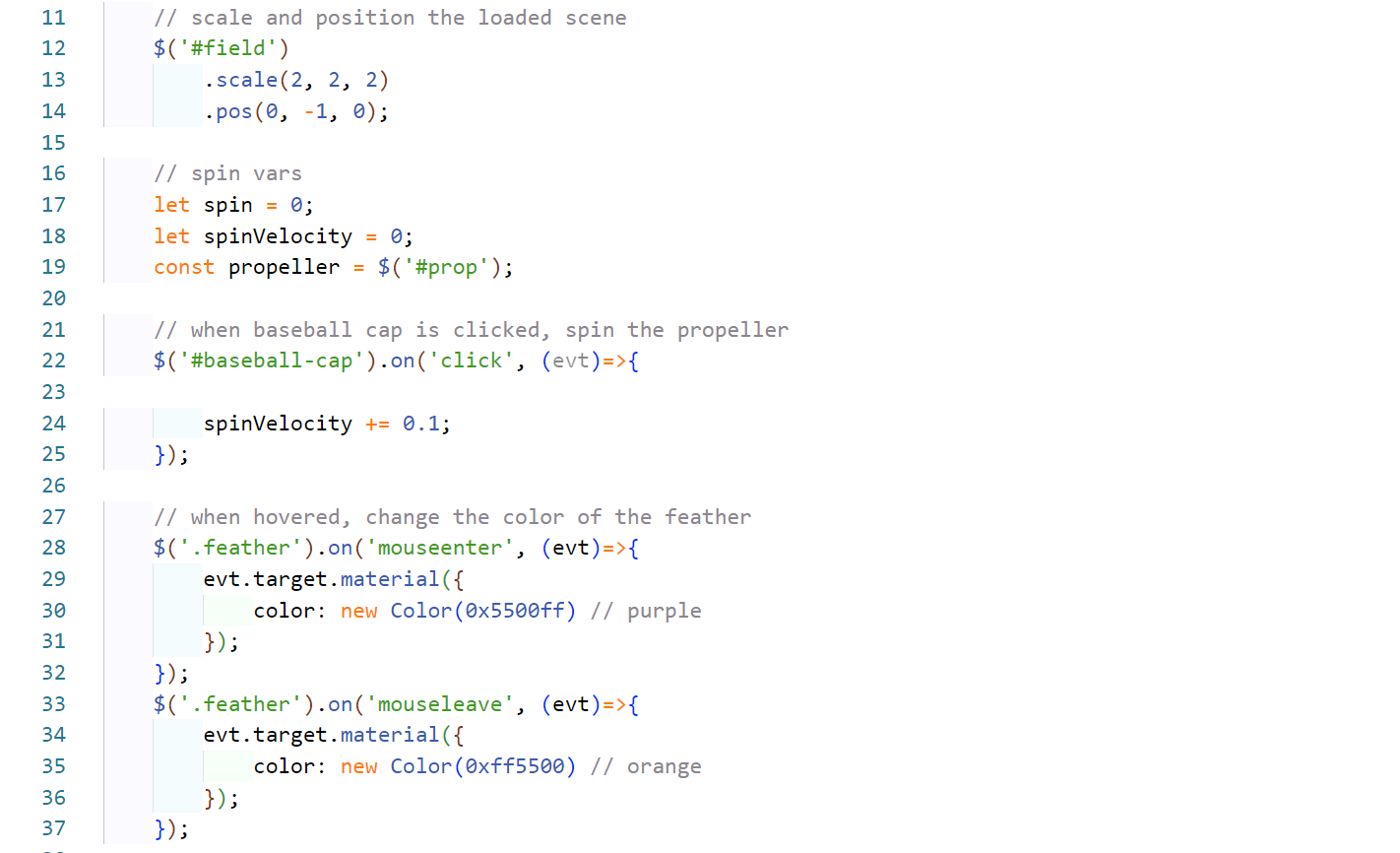
So I decided to add an event layer - if ThreeQuery has access to your ThreeJS scene object, it can find your canvas and camera, and automatically set up raycasting. The you can add standard mouse events to 3D objects with the .on('mousedown') syntax. Take a look at the screenshot below:
Overall, the project was a success, I now have a custom library that let's me work with exported Scenes from Blender and rapidly throw together interactive 3D scenes with just a 3D model and some basic vanillaJS.
You can find the libraries homepage here, with the full docs:
https://orokro.github.io/ThreeQuery/
You can see the project's source here on GitHub:
https://github.com/orokro/ThreeQuery
And of course you can find it on NPM here: