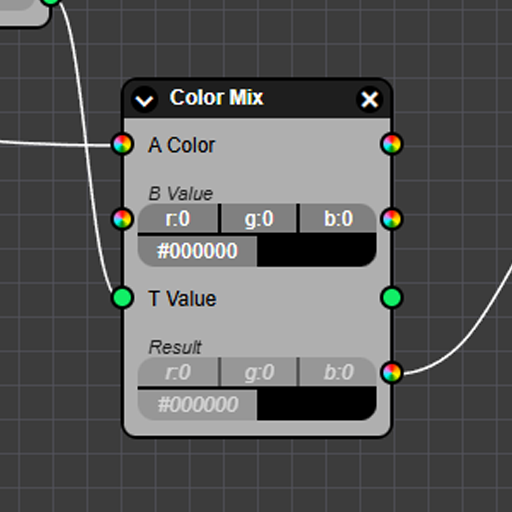
Many years ago I wrote about a project I made called Node Bucket. I didn't know it at the time, but I had effectively made CPU-based shaders using a node graph to program them.
I've always loved using nodes as an interface to build things. They expose functionality in ways that is easy to grasp and mess with effortlessly. When I was learning Blender I was initially terrified of Blenders node system for shaders, but once I sat down and actually learned it I immediately fell in love. I since used node graphics elsewhere, including making shaders for Unity, Blenders Geometry Nodes, and more.
Ever since, I wanted to revisit the Node Bucket idea, as well as the idea of using Nodes to make procedural sounds. To do so, I began working on make my own Vue3 compatible Library for nodes - fully customizable for any application.
This project is currently in progress, but most of the UI is done, and it's just a matter of polishing the library and adding some quality of life features. Take a look at the example node graph below:
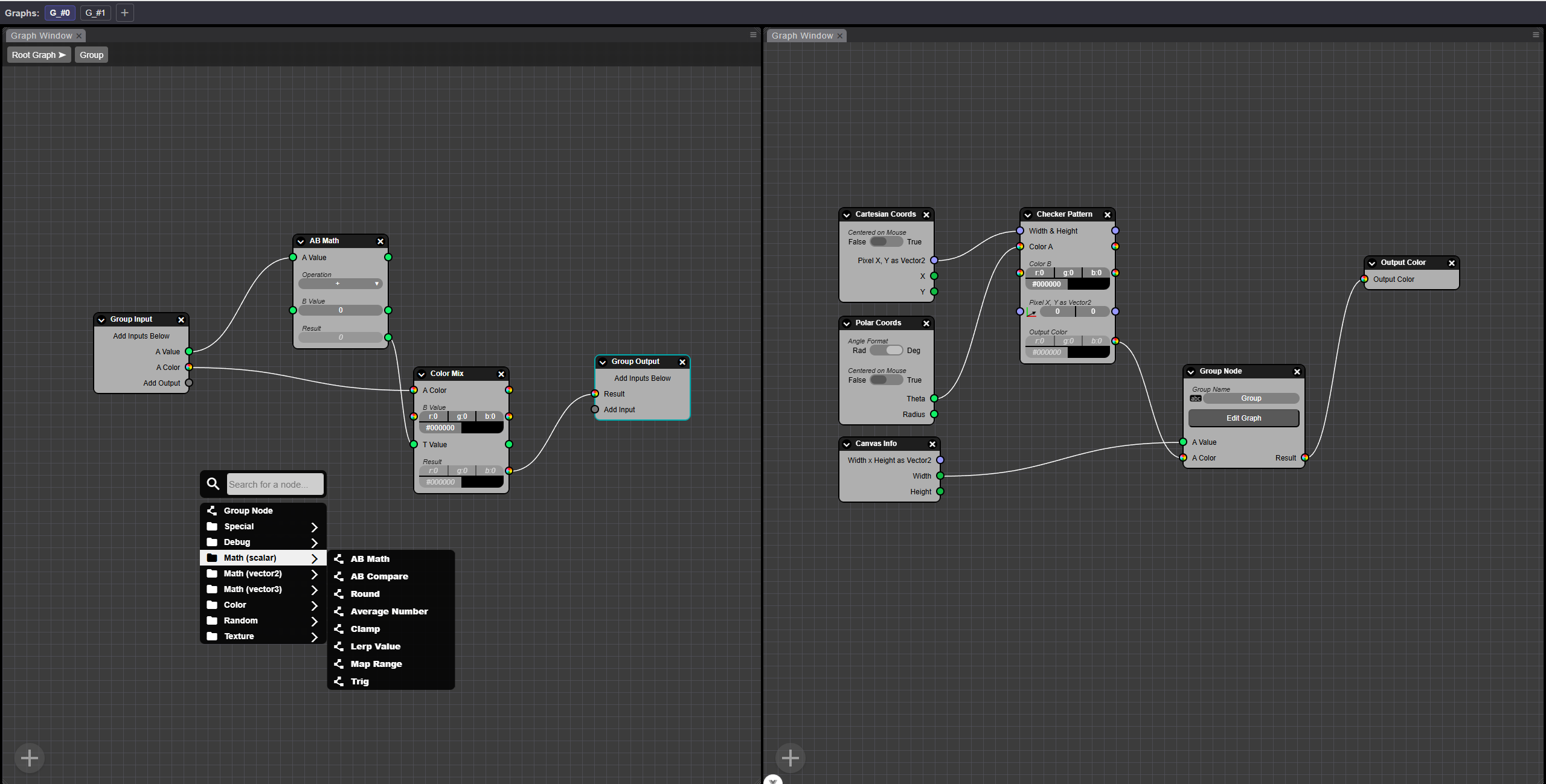
Unlike my previous experiencing making a node system, this time I tried to make it as generic as possible so it could be used as a library for any potential application, but also easy to use. It turns out, making something generic and library grade is significantly tougher, but I think I came up with a pretty elegant solution. Let's first talk about how nodes are created. Peep the class below:
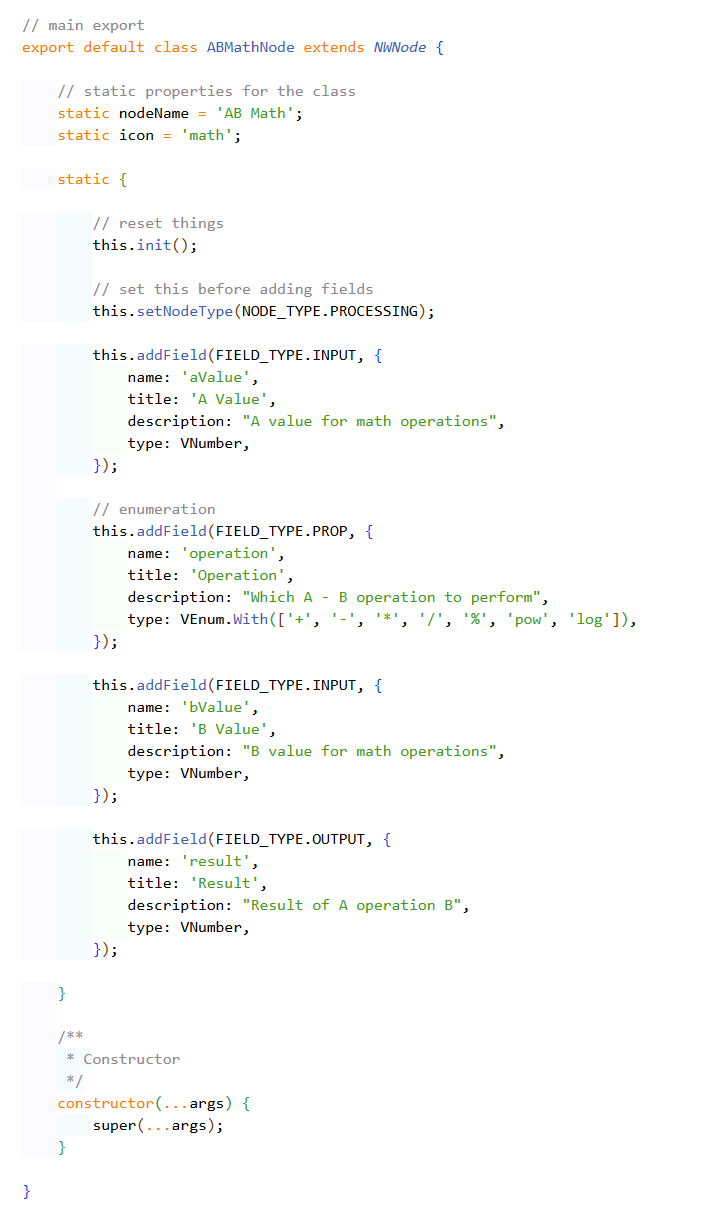
While the system ships with some basic nodes out of the box, you can very easily add your own nodes. As you can see from the class above, it's pretty straight forward.
First, import & extend the
NWNodeclassNext you can give it a static name and a path to an icon, it also supports Google's material UI icon-slugs for quick icons. The name and icon will be used in the 'Add Node' menu.
Then, in a static block, you can simply set the node type and then add a bunch of fields. Via the API you can add this node constructor to the NWEditor Vue3 component, and it will automatically able addable from the menu. It will also automatically generate UI for the node based on the type and the fields provided
There's a bit more to it than that, like optionally providing a function to do work, though that's not required.
On the subject of types - I wanted the system to be able to support all the primitive types you'd expect - numbers, floats, strings, etc.
But I also wanted a way to easily add new types to use in your node fields - so your wires can carry any data you'd like. Below is an example of making a custom type:
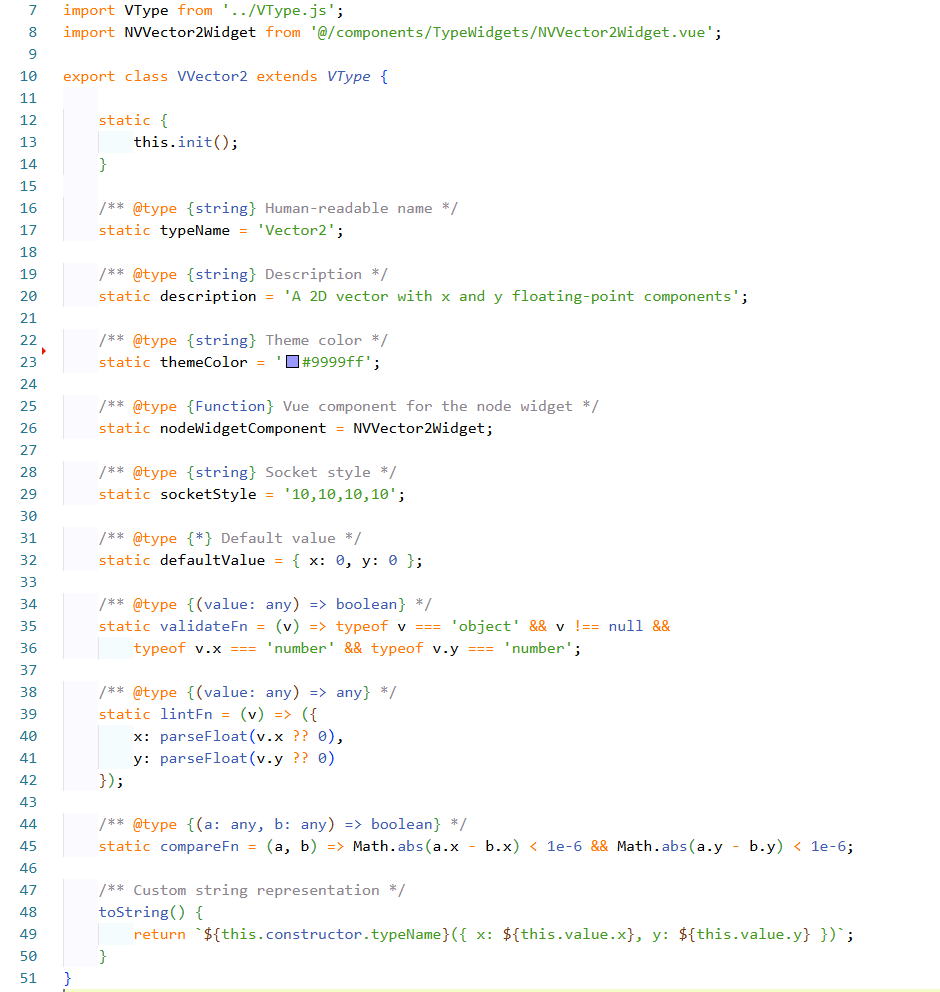
As you can see here, the system is pretty self explanitory:
First, import and extend the
VTypeclassNext, just replace all the static fields with your own values
themeColor will the color of the socket on your node
nodeWidgetComponent is a reference to a Vue3 component you write yourself. Any nodes that use your new VType will automatically mount this component, so you can provide custom UI for any special types you created.
validateFn, lintFn, and compareFn do what you expect - since you're providing types to work with custom data, you can also specify custom methods to work with the data
There's a few other fields you can see, but that's the just of it - by extending VType you can add types for any custom data that will render their own UI and work in any custom nodes you build.
I didn't mention it earlier, but both VTypes and NWNodes can provide their own UI. You don't have to use the automatically generated UI at all. Below is a screenshot where a node uses a completely custom UI. It's definition is still the same, but the node instance provides an API to specify where the input and output sockets should be so you can place them over your custom UI.
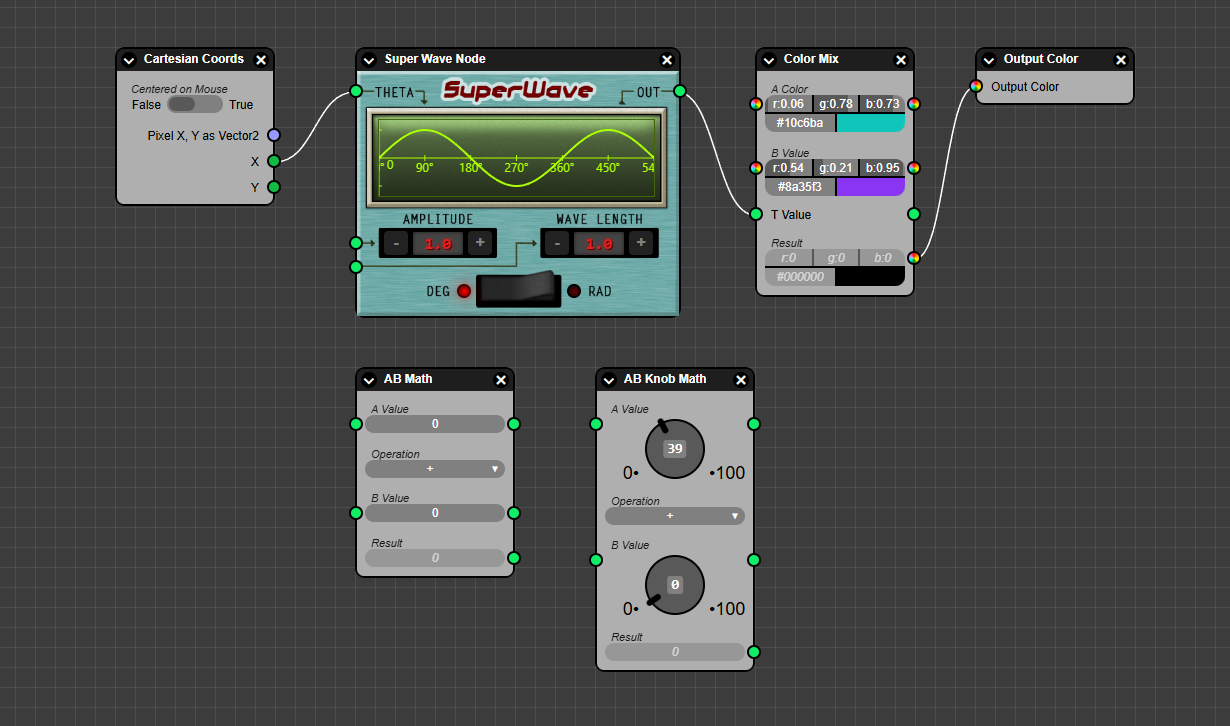
Also, in the above screen shot you can see two nodes, "AB Math" and "AB Knob Math".
AB Math is a stock node that just does an operation like A+B. It uses the default components to render number types.
But, the AB Knob Math node provides custom types that instead use a Knob widget. This widget is not stock, but is an example of you you can provide Vue3 components in your VType definitions and they'll automatically mount when a custom node uses that custom type.
Another really cool feature is the Type Registry system:

When constructing your scene, you can import an array of your types and pass them into the type registery. That, by it self doesn't do much - it just informs the nodes what types will be available, and may throw errors if you use a type that wasn't added to the registry.
The real power comes in with the built in type-coalition system.
After you import your types, but before you add them to the registry, you can add "to" and "from" coalescers, like below:
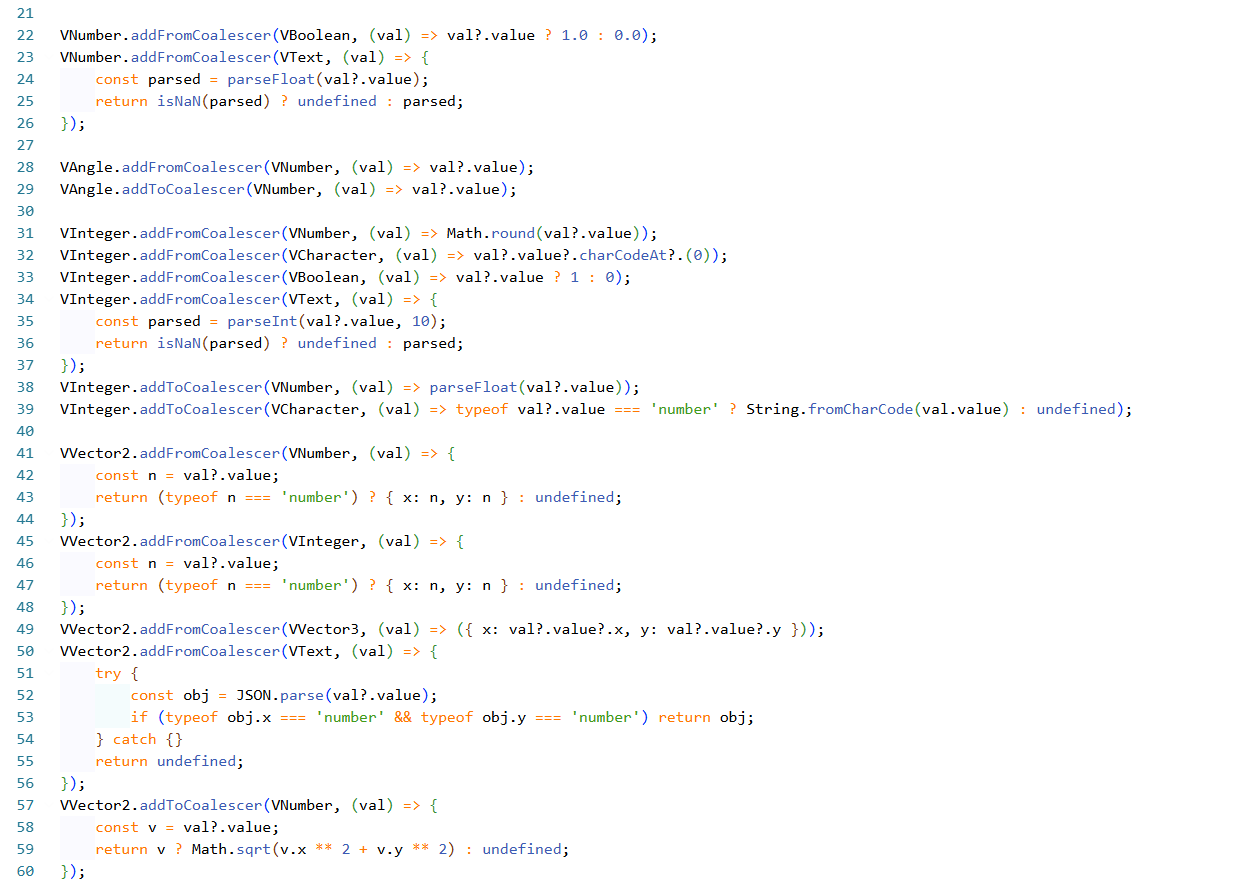
The way this works, is you can provide one or more functions from how to convert any type to any other type. You can also provide functions from any other type, to the target type.
The type registry will take these into account, and automatically allow you to convert between types. So when the user drags a wire from one socket to a different socket type, it will show a popup saying that a conversion will happen, but still allows the wire to connect.
If there's no available way to convert, then it will prevent the user for doing the wiring.
But here's the truly magical part: the Type Registry will automatically build an internal graph of what types can convert to other types, and will automatically chain conversions! Consider the following example:
You make a Color3 node that has {r, g, b} values
You tell this type in can convert to/from Vector3 which has {x, y, z} fields
You tell the Vector3 type that in can convert to Number, by converting it's {x, y, z} to a magnitude float
The user can then wire a Color3 into a Float socket, and it will tell the user "Color3 -> Vector3 -> Float" as the coalescence chain
So even though you didn't provide a coalescer function to go from Color3 -> Float, the system maintains it's own internal graph of available conversions and will automatically use a Vector3 as an intermediate. There is no limit to the chain length. If it's possible to find a valid chain of coalescer converters form one type to another, it will automatically find the chain.
Of course, you might not want to prevent certain conversions because it wouldn't necessarily make sense. In this case, you can provide coalescer functions that simply return null and if the Type Registry detects a null in the chain of conversion it will stop and prevent the user from making the wired connection!
The system also provides support for Group nodes that allow sub-node graphs, and the system provides an optional built in menu for adding nodes. Of course, if you want to provide your own UI you can add nodes via the systems API as well. The library also provides full color theming support, so you can theme everything to your applications style.
Over all, I'm really proud of this library. It's not fully done yet - it needs serialization/deserialization for node graphs. It needs it's live processing to work. Right now the optional processing functions don't actually evaluate, but that's next to do.
As I mentioned earlier, there's a few applications I want to build using nodes, so as soon as this library is done, I'll be dogfooding it myself!
Note: I'll add the github and NPM links when the library goes live.